
Scenarios
One Council, More Than One Way to Look at the Future
A scenario is a forecast with different assumptions. Different to what? To another forecast for the same council. Most often the difference is the map: suburbs in one scenario, SA2s or wards in another. It can also be a different growth story, where the dwelling assumptions change and the map stays the same. And it can be both at once, a new geography carrying its own dwelling assumptions.
Every forecast comes with one scenario included. Add more and they sit side by side in Place Forecast, so switching between them takes one click.
What Scenarios Are Used For
Different geographies for different teams. One set of boundaries rarely serves everyone. A suburb-based scenario suits general planning, the early years team might need SA2s for kindergarten planning, the governance team wards, and activity centres serve strategic planning and economic development alike. Each is a full forecast with population, dwellings, births, deaths, migration and ageing for its own small areas.
Different growth stories. A precinct structure plan that may or may not go ahead, a slower build-out, a housing strategy under review. A growth scenario keeps the map and changes the dwelling assumptions, so you see the same small areas under two futures. The assumptions carry more than a count of dwellings. You can set detached against medium or high density, add or reduce dwellings once, across a time span or ongoing, and set occupancy and average household size, so a scenario can tell a different housing story rather than only more or fewer homes. The Council Housing and Dwelling Assumptions page lists every field with worked examples.
Both at once. The two mix freely. A precinct scenario can draw the precinct as its own small area and load the dwellings expected there, in one scenario.
An evidence base for targets set outside council. When the state hands down housing targets, a scenario that carries those dwellings shows what the target means for population, age groups and households in each small area. It sits next to your main forecast, so the response to the target rests on the same method as the forecast you plan with.
Sandbox scenarios for one-off questions. Staff have questions every now and then that only need answering once. A sandbox scenario is a scenario kept for exactly that, and it has its own section below.
Forecast or Scenario?
We use the two words loosely, and so do our clients. A council with one forecast simply calls it the forecast. Once there is a second one for the same council, with different boundaries or different assumptions, both get called scenarios. There is no exact line between the two words. What matters is that a scenario is a full forecast, and what makes it a scenario is that its assumptions differ from another forecast for the same council.
How Scenarios Show Up in Place Forecast
Each scenario carries a name in brackets after your council's name, for example Whittlesea (SA2 Scenario), and the original forecast appears as Main. On every page of a forecast, the Scenario badge under the menu bar shows which scenario you are looking at. Hover over it or click it and the switcher lists the scenarios you have access to. Pick one and you land on the same page in that scenario.
Each scenario is a forecast in its own right, with its own versions and its own user access, so a team can work in one scenario without seeing another. Who sees what is your call. The Forecast Access page covers states, series and roles.
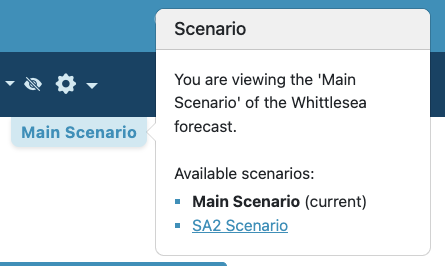
The Scenario badge on a forecast page, with the switcher open
Why the Numbers Differ Between Scenarios
Two scenarios with different small areas won't add up to each other, even where one area sits neatly inside another. That is expected. Each scenario is calculated on its own, with occupancy rates, household sizes and migration patterns applied at the level of its own small areas. A suburb with fast new development carries its own local rates in a suburb scenario, while an SA2 scenario spreads one rate across the whole SA2. Both are right for their purpose.
The practical rule: use the scenario whose small areas match the question you're answering. For a kindergarten catchment, use the scenario built on that catchment rather than adding up pieces of another one.
Sandbox Scenarios
Not every question deserves a permanent scenario. Every now and then a staff member needs an answer once: the population aged 3 and 4 across a handful of SA1s for a kindergarten study, a proposed precinct a planner wants to test, a catchment drawn around a single facility. Once the report is written, nobody needs that particular setup again.
A sandbox scenario is a scenario you keep for trying things out. You tell us the areas and, if the question needs them, the dwelling assumptions (a list of SA1s or suburbs, a marked-up map, a shapefile, a table of dwellings), we set the scenario up that way, and you take the answers out. When the next question comes along from another team, we change the geography or the assumptions again, and you take those answers out. Try things out, get answers, move on. Nothing in it has to be permanent; the scenario simply carries the last question it answered until the next one arrives.
A sandbox scenario stays up. We don't take it down between questions, and it looks and works like any other scenario: charts, tables, filters and downloads all work, it appears in the switcher next to its siblings, and you decide who at council can see it.
One sandbox scenario covers a whole year, however many questions come up and however many times it changes. There is no limit on the number of updates, and no extra charge for them.
That is also what makes it the economical choice. Setting up a fresh scenario for every small question would mean paying for ten, twenty or thirty scenarios over a year, each answering a single question, and even at a large discount that adds up to a lot of money. A sandbox scenario answers all of them for the price of one.
What Scenarios Cost
An additional scenario costs about 75% less than a standalone forecast with the same number of small areas. In other words, you pay roughly a quarter of the standalone price. The first forecast for a council takes a lot of setting up: getting to know the council, the data, the assumptions and the people. By the second one we already know you, so it costs us far less to set up and to maintain, and we pass that saving straight on. It is a volume discount as well: the more scenarios a council runs, the less each one costs. The Pricing page has the packages and worked examples.
A sandbox scenario is priced the same way as any other scenario, on its small area count, for a year. All updates are included in every scenario, and that matters most for a sandbox scenario, where the whole point is changing it often. However many times we rebuild it during the year, the price stays the same.
How to Get a Scenario
The starting point is a conversation about what you need the scenario for. Get in touch and tell us the question you want answered, and we'll work out together whether it calls for a geography scenario, a growth scenario, a sandbox scenario, or a change to the forecast you already have.
From there, send us the areas in whatever form you have them: a list of suburbs or SA1 codes, a map with the boundaries drawn on, or a shapefile. For a growth scenario, send the dwelling assumptions that differ from your main forecast. We build the scenario, run it, and send you the link. Boundaries usually take a round or two to settle, and we're happy to go through several until they feel right.